What Vibes Builds Well Today
A plain-language tour of the October 2026 build test: 76 conversations, 38 different app requests, and what each one produced.
Start here
What Vibes is. Vibes (vibes.diy) makes small apps from a sentence. You type what you want, like "a bingo game from our family's inside jokes" or "a bill splitter that reads the receipt from a photo", and a few minutes later you have a working app with its own link. You can open that link on your phone and send it to the people who'll use it. Then you keep talking: "let my roommates add flyers too", "add a big total at the top". Each request changes the app you already have.
How we tested it. On October 6, 2026 we ran our sixth round of a structured test, using the version of Vibes that is shipping now. Every test is a short conversation with Vibes, written the way a real person types:
- a first request that builds the app;
- a sharing or data follow-up, such as letting a partner in, saving favorites, or showing who did what;
- a visible follow-up, such as a calendar view, a big banner, or confetti.
Every conversation ran twice, from scratch, so we could see whether a good result happens reliably or only once in a while. In total that came to 76 conversations and 218 turns. Each typical build took about two and a half minutes, and Vibes started on the work within about 25 seconds of being asked. Since this test we've got that down to about 15 seconds.
What the scores mean. After every build, an independent AI judge read the app and looked at a phone-sized screenshot of it filled with sample content. It gave two scores, each out of 5:
- Feature: did it do what was asked? A 5 means everything requested is there and working. A 4 means the request was met with a small gap. A 3 or lower means something important was missing.
- Design: how does it look? A 5 means flawless and production-ready. A 4 means clean, cohesive and polished, with minor nits. A 3 means decent but plain, or with a visible rough edge.
The judge is strict about design. Across all 190 design scores it gave exactly one 5, and nothing scored below 3. On this scale, a 4 means a clean, good-looking app.
The headline numbers.
- On the main set, apps averaged 4.79 out of 5 on doing what was asked and 3.84 out of 5 on looks.
- Of 204 graded builds, 152 got a perfect 5 on doing what was asked, 45 got a 4, and only 7 scored lower.
- Not one turn "went dead": every request got an answer.
What a "holdout" is. Part of this test uses holdout prompts. These are app ideas we deliberately never use to tune or improve Vibes. They're a fair check: if Vibes does well on them, it's because it's good at building apps in general, not because it has practised that one. Each holdout is asked three ways: a full, detailed description; a plain one-liner like people actually type; and a bare two-to-four-word version. Holdouts averaged 4.65 on doing what was asked and 3.74 on looks, close to the main set. That closeness is what we hoped to see.
About the screenshots. The screenshots the judge sees are taken in a capture mode that can't paint AI-generated pictures. Generated portraits, cookie photos and model artwork show up as grey boxes with a line of description text. In the real app those pictures paint. This costs a few design points on picture-heavy apps, and we say so where it happens.
reunion-bingo-1-hero, rep 0, final turn.Part 1: The eight everyday apps
These eight come from the kinds of apps people most often ask Vibes for, grouped into eight families. Each was built from its first request, then changed twice.
1. Game night arcade: a Minecraft-style world for friends
First request: "make a minecraft style game where i can build and break blocks and my friends can join the same world"
Follow-up 1: "let friends i invite build in my world, and everyone else can walk around and watch"
Follow-up 2: "add a hotbar at the bottom so i can pick from 5 block types with the number keys"
What you get. A real 3D block world in the browser, with names like Craft Together and Shared Cubeworld. Land is generated as you explore. You walk with the keyboard (or a touch pad on a phone), click to break blocks and right-click to place them. Other players appear in the world as little blocky figures with their names over their heads. A "Worlds" menu lists your own worlds and any you've been invited into. After the first follow-up, the owner can name friends who are allowed to build, and anyone else who opens the link walks around as a watcher; the screen says "You're watching" instead of offering tools. One version added a "Copy watch link" button. After the second, a row of five colored blocks (Grass, Dirt, Stone, Planks, Brick) sits along the bottom, and the number keys 1 to 5 switch between them. On a phone the five buttons wrapped onto two rows, and Vibes pointed this out and offered to shrink them.
The screenshot shows a soft green start card that says "Ready to build?" over a pale sky, with chunky rounded block buttons in grass-green, dirt-brown, stone-grey, plank-orange and brick-red.
eight-apps-1-game-night-arcade, rep 1, final turn.Scores. Averaged 4.5 out of 5 on doing what was asked. The judge took a point off a couple of times because friends need to be invited rather than joining instantly. Looks averaged 3.5: "clean, cohesive... color-coded block buttons" in one version, but in the other a start card overlapped the block bar and the layout felt "more prototype than polished game UI."
2. Music and art toy: a drum machine you can share
First request: "drum machine with a step sequencer and tempo, let me save my beats"
Follow-up 1: "let me send a beat to a friend with a link so they can play it on their phone"
Follow-up 2: "light up each step as the playhead passes over it"
What you get. Beat Box and Pad Machine: a grid of drum tracks (kick, snare, closed hat and more), 16 steps each, with Play, Clear and a tempo you set from 60 to 200 beats per minute by slider or by typing. You name a beat and save it to "My beats", where you can load, rename or delete it. Three example beats ("Four on the Floor", "Boom Bap", "Breakbeat") are ready to add. After the first follow-up, a Share button opens the phone's share sheet. The beat itself travels inside the link, so your friend doesn't need an account to listen, and they can tap "Save to my beats" to keep it. Opening a link doesn't open up your other saved beats. After the second follow-up, the column under the playhead lights up as the beat plays, and active pads "pop up" in a bright accent. On a phone, the grid even scrolls along with the playhead.
The screenshot shows a cream page, a big lavender Play button, a sky-blue "120 BPM" tag, a tempo slider, and rounded white cards for each drum with numbered step buttons.
eight-apps-2-music-and-art-toy, rep 0, final turn.Scores. A perfect 5 out of 5 on doing what was asked, on every turn of both versions. Looks averaged 4: "Clean, cohesive purple/cream color scheme with good visual hierarchy." The judge's one recurring nit was that the tempo shows up in three places at once.
3. AI from a photo: what to cook from your fridge
First request: "take a picture of whats in my fridge and give me 3 recipes i can make tonight, and when i want one i can tap a recipe to get a picture of it"
Follow-up 1: "save the recipes i like to a favorites list thats still there next time i open it"
Follow-up 2: "add a cooking timer on each recipe card that starts with one tap"
What you get. Fridge Wonder and Stomach Call Fridge. You snap or upload a fridge photo, and the AI lists what it sees as little ingredient tags you can remove or add to. Then it writes three dinner recipes with cook times and steps. Tap a recipe and it paints a picture of the finished dish, which is saved with the recipe; "New picture" makes another. Past fridge scans stay below so you can go back to them. After the first follow-up, a Tonight / Favorites switch and a heart on each recipe let you keep the ones you like. They're still there next time, picture included. After the second, each recipe card gets a timer: one tap counts down from the recipe's cook time, with pause and reset, and several can run at once. When one hits zero the card says "Done!", beeps, and buzzes your phone. In one version the timers survived a page refresh and offered a phone notification.
eight-apps-3-ai-from-a-photo, rep 1, final turn.The design screenshots show a calm mint-and-teal (or muted purple) page with rounded ingredient chips and recipe cards.
Scores. Averaged 4.33 on doing what was asked. The judge docked a point in some turns because you have to sign in before snapping a photo. Looks averaged a solid 4: "Clean, modern layout with good visual hierarchy."
4. Small-business front counter: a cookie shop's order form
First request: "order form for my cookie shop, customers pick flavors and a pickup time without signing up, each flavor shows a picture of the cookie, i see all the orders on my side"
Follow-up 1: "let my partner see all the orders and mark them ready too, and each customer sees just their own order"
Follow-up 2: "add a daily special banner at the top that i can change from my side"
What you get. Cookie Clock Orders and Cookie Club Orders. Customers open the link and see the menu as picture cards with a quantity picker. They choose a pickup date and time, leave a name and contact, and place an order. They never have to sign up. The owner sees every order grouped into Today, Upcoming and Past, with buttons to move each one from New to Ready to Picked up. After the first follow-up, the owner's partner can be added on a Team tab and can see and mark orders too, while each customer sees a "Your orders" list showing only their own orders and live status. After the second, the owner gets a Daily special box. They type a headline like "Pumpkin snickerdoodles, 2 for $5", and it appears as a banner at the top for every customer.
The screenshot shows a warm peach page titled Cookie Club Orders, sky-blue Orders / Flavors / Team tabs, and white order cards for Maya, Theo and Priya with green "READY" and blue "NEW" status tags.
eight-apps-4-small-business-front-counter, rep 1, final turn.Scores. A perfect 5 out of 5 on doing what was asked, on all six turns. Looks averaged 3.5. The polished version got 4s ("well-organized... clear status badges"). The other got 3s because the cookie pictures showed as grey placeholders in the screenshot, and that's the capture limit described above.
5. Work dashboard: generator maintenance for a field team
First request: "maintenance tracker for our field techs. each generator has a service schedule, techs log visits from their phone, office sees whats overdue on a dashboard, email the manager every monday"
Follow-up 1: "let each tech sign in so every visit they log is saved under their name"
Follow-up 2: "add a color-coded calendar of upcoming services to the dashboard"
What you get. PowerCheck Maintenance and Mighty Gen Tracker. The office dashboard has three big status cards (Overdue, Due this week, On schedule), each with a clear icon. There's a generators list with service intervals, a phone-friendly "Log visit" form for techs, and a Team tab for inviting people. A weekly report goes to the manager's email address, at an hour you choose, with a "send test report now" button. After the first follow-up, every visit shows "by @name", the log form says "Logging as @name", and nobody can log a visit under someone else's name. After the second, a month calendar appears under the stats, with red, yellow and green dots for overdue, due within a week, and scheduled. You can tap a day to list what's due.
The screenshot shows a mint-green page with coral, yellow and green icon tiles and the calendar starting below. Vibes itself noticed that the sample generators all read as overdue because their example dates were stuck in early 2025, and offered to move them.
eight-apps-5-work-dashboard-spec, rep 1, final turn.Scores. A perfect 5 out of 5 on doing what was asked, every turn. Looks averaged 4: "Clean mobile-first dashboard... color-coded status cards." One thing we've since changed: the Monday email was connected through an outside automation service. Vibes now does this kind of message with the app's own notifications.
6. Neighborhood board: report a problem, upvote it, mark it fixed
First request: "neighborhood app where people post a photo of a problem like overflowing trash and others can upvote it"
Follow-up 1: "let whoever posted something mark it done with a thank-you note"
Follow-up 2: "add a map view with a pin for each post"
What you get. Block Break Report and Block Picture. Neighbors post a photo and description of a problem, others upvote it (one vote each, tap again to take it back), and the list sorts by votes or newest. You filter by Open or Fixed and by category. You invite neighbors by handle, and only invited neighbors can see and post. After the first follow-up, the person who posted a report gets a "Mark done" button with an optional thank-you ("Thanks to the city crew for clearing this so fast!"), and fixed reports show a green thank-you card. After the second, a Map view drops a pin for every report. When posting you can tap a spot or "Use my location", and reports without a pin are placed from their written address when possible.
eight-apps-6-neighborhood-board, rep 0, final turn.Scores. A perfect 5 out of 5 on doing what was asked, every turn. Looks averaged 3.8: "Clean, modern layout with good visual hierarchy." The judge marked down a stray emoji status dot and an example "overflowing trash" card that showed a flower photo. Vibes caught the flower itself and offered to fix it.
7. Personal tracker: habits, streaks and a heatmap
First request: "habit tracker with streaks and a calendar heatmap, just for me"
Follow-up 1: "keep my streaks saved so they're all there when i come back tomorrow"
Follow-up 2: "add a little confetti burst when i finish all my habits for the day"
What you get. Streaky and Streak Space: private to you, with a "Done today" button on each habit, a current streak and a best streak, and a calendar heatmap of recent months where you can tap a past day to fill in a check-in you forgot. The first follow-up was already true. Every tap is saved the moment you make it. In one version Vibes simply explained this, adding one improvement (the app now rolls over to the new day at midnight). After the second follow-up, finishing your last habit for the day sets off a burst of confetti that fades after a couple of seconds, and phones set to reduce motion skip it.
eight-apps-7-personal-tracker, rep 0, final turn.Scores. A perfect 5 out of 5 on doing what was asked on every graded turn. Looks averaged 3.6. One version was "clean, cohesive blue-toned". In the other, the 12-week heatmap rendered blank in the screenshot. Vibes spotted that and offered to fix it.
8. Group plans: a cabin weekend with a shared bill
First request: "plan our cabin weekend, who's bringing what and who paid for what, split it at the end"
Follow-up 1: "let everyone on the trip add their own items and payments from their phone, and i'm the one who adds people to the trip"
Follow-up 2: "add a settle up screen with who owes who and the trip total at the top"
What you get. Weekend Cabin Planner and Cabin Pile. There's a "bring list" where people claim items, an expenses list (amount, who paid, split between whom), and a settle-up view that works out the fewest payments needed to even out, like "Maya pays Sam $42", each with a "Mark settled" switch. A sample Lake Tahoe trip is ready to add. The first follow-up was already built in. Vibes explained that once you add someone, the trip appears on their phone under "Trips shared with you", and only you can add people or change trip details. It also flagged a choice for you: right now anyone on the trip can edit anyone's payments. Should it tighten that? After the second follow-up, a Settle up tab opens with the trip total at the top, then each person's balance, then who owes whom.
eight-apps-8-group-plans, rep 1, final turn.Scores. A perfect 5 out of 5 on doing what was asked. Looks averaged 4: "Clean, cohesive pastel design... well-styled avatar chips."
The eight everyday apps: strengths and weaknesses
On average: 4.84 out of 5 on doing what was asked, 3.80 on looks.
Strengths
- Doing what was asked is the norm. Five of the eight apps scored a perfect 5 on every graded turn.
- Sharing comes out right. Friends who build versus watchers who look, a partner who sees all orders while customers see only their own, an owner who alone adds people to a trip: these rules were built as asked.
- Follow-ups change the app you already have. Every follow-up kept what was there and added the new thing. When the app already did what was asked, Vibes said so plainly instead of rebuilding.
- Vibes reports honestly. It regularly says what it hasn't tested yet ("I haven't tried the number keys"), points out what looks off in its own screenshot, and offers the fix as a next step.
- Every app comes with a ready-made sample (a demo trip, example beats, a sample neighborhood) that you add with one tap. Your real app starts clean.
Weaknesses
- Looks are good but rarely great. Most screens landed at "clean with minor nits". Recurring nits: duplicated headings ("TODAY" over "Today orders"), crowded button rows, and the Vibes DIY badge covering a bottom tab on phones.
- Sample dates go stale. Example data was often dated months in the past, so streaks read 0 and generators all read overdue in the preview. Vibes caught this each time, but it shouldn't need to.
- Sign-in sometimes comes too early. The fridge app asked for sign-in before you could try a photo, and the judge marked that down.
- The screen sometimes flickers while it checks who you are. For a moment while the app works out who you are, some apps briefly show a "Only the creator can invite people" note or an empty screen before settling. Across the whole test, apps held the screen properly on about 6 in 10 turns.
- The weekly manager email used an outside automation service rather than the app's own notifications. That has since been changed.
Part 2: Four "agentic" apps that do work for you
These four go a step further than storing what people type. The app reads messy input (a group chat, a photo of a notice, "I'm free weekends"), turns it into tidy records, waits for a person to confirm before acting, and tells the right person when something changes. With the eight everyday apps, they make up the "top twelve".
9. Potluck organizer
First request: "Run our potluck. Accept everyone's contributions in their own words, track servings and declared allergens, flag gaps, and notify participants when plans change. Never guess whether food is allergy-safe."
Follow-up 1: "let each guest sign in and change only their own dish, and i can change anyone's"
Follow-up 2: "add a card for each dish with its allergens in big letters so people can read it at the table"
What you get. Potluck Road and Potluck Gather. Guests (or the host, pasting a group chat) describe dishes in their own words, and the app turns them into dish cards with servings and declared allergens. A Gaps panel shows what's running short ("desserts running short, no drinks yet"). When the time, place or a dish changes, everyone in the potluck gets a notification, and an Updates feed keeps the history. The allergy rule is handled with real care. Allergens appear only when the cook names them. Anything else reads "ALLERGENS NOT DECLARED. ASK THE COOK", and nothing is ever labelled safe. In both versions, the first follow-up was already how the app worked, and Vibes explained it. It also pointed out a subtle catch: a dish belongs to whoever typed it in, so if the host pastes the group chat, guests can't edit "their" dishes. It offered a way to hand a dish over. After the second follow-up, a Cards tab prints one big-lettered allergen card per dish, such as "CONTAINS: MILK, WHEAT/GLUTEN", one per page.
The screenshot shows a warm peach page, "What's on the table", and dish cards with yellow "DECLARED: DAIRY" tags, a blue "COOK DECLARED NO ALLERGENS" tag, and an orange "SERVINGS UNKNOWN" tag.
agentic-apps-1-potluck, rep 0, final turn.Scores. A perfect 5 out of 5 on doing what was asked. Looks: a solid 4 ("effective allergen tag system using color coding").
10. School notices into a family action list
First request: "Turn photos of school notices into a family action list. Extract supplies, forms, and dates for me to confirm, merge duplicate notices, and remind whoever volunteered to handle each item."
Follow-up 1: "let my partner sign in too so we both see the same list and can each claim items"
Follow-up 2: "add a week view that shows every item on its due date"
What you get. Family Homework Hub and Backpack Tip Sheet. Snap or upload a notice, or paste its text. The app pulls out supplies, forms and dates and marks each "To confirm" until you OK it. Duplicate notices are spotted and offered for merging. Either parent taps "I'll handle it" on an item, and reminders go to whoever claimed it (one version sends them at 7 pm for anything due in the next two days, and nudges you about anything unclaimed). For the partner follow-up, Vibes explained the family sharing already in place and offered two ways to add them: type their handle or email yourself, or tell Vibes the handle and it adds them. After the second follow-up, a Week tab lays items on their due days ("Nothing due" on empty days), with previous/next week buttons. One version also fixed the bottom bar so the Vibes badge stopped covering a tab.
agentic-apps-2-notice-actions, rep 0, final turn.Scores. A perfect 5 out of 5 on doing what was asked. Looks averaged 3.75. Mostly "clean, cohesive", but one version showed the account name twice and had an awkward button.
11. Volunteer shift coverage
First request: "Keep our volunteer shifts covered. Let people submit availability however they like, show unfilled shifts, and notify eligible volunteers. Only assign someone after they accept."
Follow-up 1: "let each volunteer sign in and see the shifts they've accepted plus the open ones they could take"
Follow-up 2: "add a coverage bar on each day showing how many slots are filled"
What you get. Regular Shifts and Shift Center. Volunteers type their availability however they like ("weekday evenings, not Fridays") and can correct the saved times. Coordinators see unfilled shifts and press "Notify eligible". One version runs a daily check that offers unfilled shifts in the coming week to people who haven't been asked yet. The consent rule holds: nobody is put on a shift until they accept, and if it's already full they're told so. After the first follow-up, each volunteer gets a "My shifts" view: shifts they've accepted, plus open shifts that fit their availability, each with "I'll take it". After the second, each day gets a header ("Saturday, Feb 6"), a count ("0/4 slots filled"), and a segmented bar that turns amber as people accept and green when the day is covered.
agentic-apps-3-shift-cover, rep 1, final turn.Scores. A perfect 5 out of 5 on doing what was asked. Looks averaged 3.8. "Clean warm color scheme... clear coverage bars", with one capture where the bars sat on a tab the screenshot didn't open.
12. Rental repair tracker
First request: "Make a repair tracker for my rental properties. Tenants submit photos and descriptions, you ask for missing details, track progress, and remind me about unresolved problems. Each tenant sees only their own requests."
Follow-up 1: "let my handyman sign in and see every request i assign him, and mark each one fixed"
Follow-up 2: "show the requests as columns: new, waiting on details, in progress, fixed"
What you get. Tenant Fix Desk and Apartment Fix Desk. Tenants report a problem with a photo and description. The app reads it and asks the tenant follow-up questions about anything missing. The landlord sees every request with status, comments, a date and a contractor, and gets a morning reminder about anything open more than a few days (one version notifies immediately on an emergency). Each tenant sees only their own requests. After the first follow-up, the handyman sees only the jobs assigned to him and a "Mark fixed" button with an optional note, and that is the only change he can make. After the second, requests become a swipeable board with New, Waiting on details, In progress and Fixed columns, and in one version you can drag cards between them.
The screenshot shows a pale blue Apartment Fix Desk, a "4 OPEN · Reminder sent: 4 open requests" line, and the New column with "Sticky bedroom window", tagged LOW, while "Waiting on details" peeks in from the right.
agentic-apps-4-repair-tracker, rep 0, final turn.Scores. A perfect 5 out of 5 on doing what was asked. Looks: a steady 4 ("Clean, warm color palette with good card hierarchy").
The agentic four: strengths and weaknesses
On average: a perfect 5.00 out of 5 on doing what was asked (every graded turn), 3.89 on looks.
Strengths
- Messy input becomes tidy records. Free-text dishes, availability in people's own words, photos of school notices, tenant descriptions: all were turned into structured, editable lists.
- "Confirm before acting" is respected. Extracted school items wait for you to confirm, volunteers are assigned only after they accept, and allergens are never guessed.
- The right person hears about it. Plan-change notifications for potluck guests, reminders to whoever volunteered, morning reminders to landlords, offers to eligible volunteers.
- Sign-in and roles come out right. Guests edit only their own dish while the host edits all, a handyman sees only his assigned jobs, and each tenant sees only their own requests.
- Vibes asks before it guesses on people. Several follow-ups ended with "What's your partner's handle?" or "Send me his handle and I'll add him."
Weaknesses
- Reminders and notifications weren't exercised in the test. Vibes was honest about this ("reminders only go out once their first evening comes around"), but our screenshots can't prove the messages arrive.
- The badge and the bottom tabs collide on phones. The Vibes DIY corner badge covered a tab in several apps. Vibes caught and fixed it in one.
- Sample dates go stale here too. "293 days open" on a sticky window is a demo artifact, and Vibes offered to move the dates each time.
- Screenshots show the first screen. New views on other tabs (the Week tab, the Cards tab, the coverage bars) weren't always in the picture, which cost a point of looks.
Part 3: The holdouts, apps we never practise on
Seven app ideas, each asked three ways, each with the same two follow-ups. Remember, we never tune Vibes against these.
13. Reunion bingo
Full request (from our homepage): "Make a family reunion bingo app. Let me paste our inside jokes, memories, or a message thread and turn them into a batch of squares I can edit. Deal a different card to each person I invite. We can mark squares and call bingo on our phones, with cards and progress saved."
Plain: "make a bingo game from our family's inside jokes"
Terse: "family reunion bingo"
Follow-up 1 (all three): "let each relative mark their own card from their phone, and show who called bingo first"
Follow-up 2 (all three): "add a big BINGO banner and a confetti burst when someone wins"
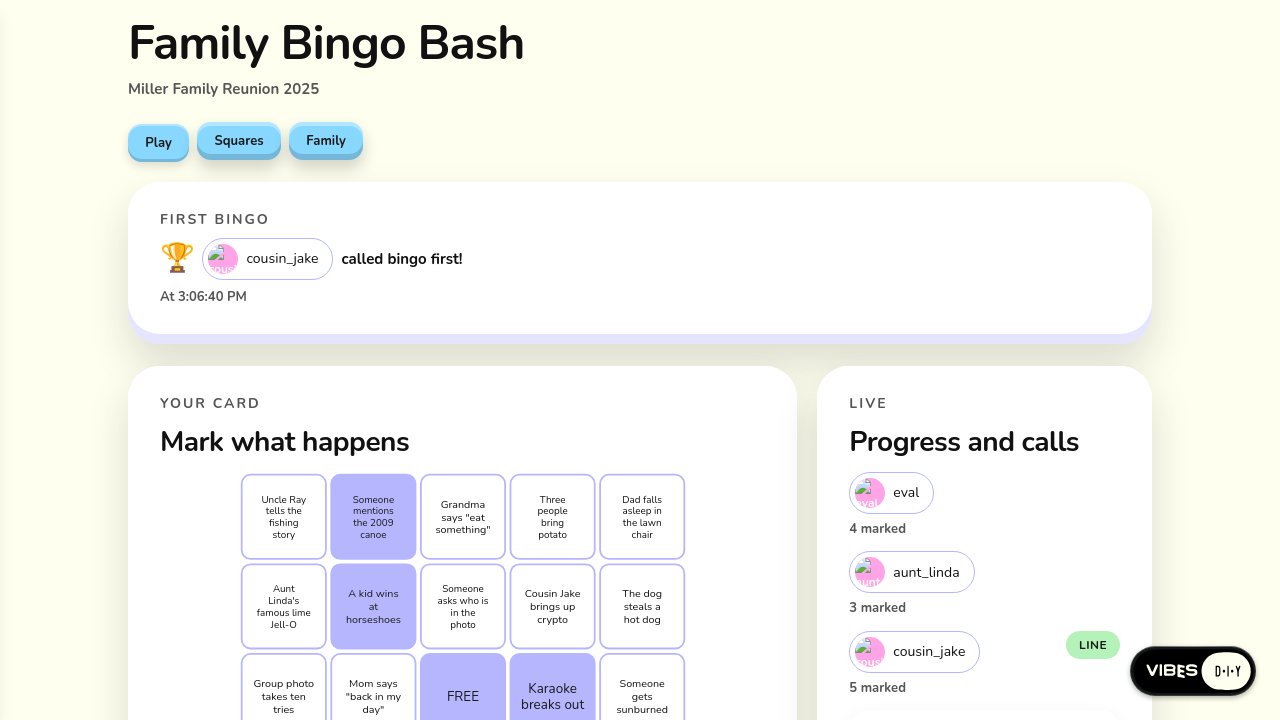
What you get. Family Bingo Bash, Kin Bingo, Lucky Reunion Bingo and three more. With the full request, you paste a message thread or a list of memories and the AI turns it into editable squares. With the plainer requests, Vibes writes 26 to 30 reunion-flavored squares to start ("Dad critiques the grilling", "Uncle tells the same joke twice", "Wifi password asked for five times"). Each invited relative gets their own shuffled 5×5 card with a FREE middle square. You tap squares to stamp them, a finished line is drawn across the card, and a "Call BINGO!" button appears. Only you edit the squares and invite people, and each person marks only their own card. After the first follow-up, a list shows who called first, second and third, with times that can't be changed afterwards. After the second, a big BINGO! banner and confetti pop up on everyone's phone that has the game open ("aunt-rosa called it first!"). Old wins don't replay when someone reopens the app, and phones set to reduce motion get the banner without the confetti.
The screenshot of Kin Bingo shows a pink page reading "Send this link to the family. Everyone gets their own card on their phone", a big pink BINGO! card ("You called it first! Tell the whole table." with a green "FIRST TO BINGO" badge), and a 5×5 grid of reunion moments with the winning top row struck through.
reunion-bingo-1-hero, rep 0, final turn.Scores. Averaged 4.89 out of 5 on doing what was asked, and 4.00 on looks, tied for the best looks of any holdout. Even the bare "family reunion bingo" scored a perfect 5 on every turn. The judge's nits: a few emoji icons, long squares cut off, and the winning line drawn over the words. Vibes spotted the last one itself and offered to fix it.
14. Bridge club
Full request: "Make an app for our bridge club's Thursday game. I invite the regulars, it deals each table, and each player sees only their own hand until dummy goes down after the opening lead. Everyone at the table sees the bidding, and it keeps a running scorecard across the weeks."
Plain: "bridge night for my foursome, we play from our phones and keep score all season"
Terse: "our bridge club"
Follow-up 1 (all three): "let me add a new regular to the club, and they see the hands they play from the next deal on"
Follow-up 2 (all three): "show the four hands around a green table with the dealer marked and the contract in the middle"
What you get. This is the hardest card game in the set, and Vibes took it seriously. With the full request it built actual play. It deals each table, keeps each hand private to its player, reveals dummy face up only after the opening lead, shows the bidding to the whole table, and scores boards by standard duplicate rules into a running season scorecard. With the plain request it built a scorepad-plus-play app with season standings and partnership records. With the bare "our bridge club" it built a club organizer: scheduled game nights with In / Maybe / Out replies, a count of how many tables of four you'll need, results and standings. That's a reasonable reading of three words. For the "new regular" follow-up, Vibes handled the privacy carefully: a hand belongs to the person it was dealt to, so a newcomer never sees hands from before they sat down. After the second follow-up, a green felt table shows the four seats, a gold "D" chip for the dealer, and the contract ("4♠ by S, Made, Vul None") in the middle. Your own hand is face up with its point count, and the other three are fans of card backs labelled "13 cards".
The screenshot of Bridge Society shows exactly that: a mint-green felt with North marked D, ruth-w, harold and you around it, and your 13 cards with red hearts and diamonds.
bridge-club-2-plain, rep 0, final turn.Scores. Averaged 4.24 out of 5 on doing what was asked, and 3.73 on looks, the lowest feature score of the holdouts. Some of that is the judge expecting things nobody asked for (named regulars already loaded, automatic Thursday invites). Some of it is real: the green table often sat below the fold on a busy first screen, so the judge "didn't see it". Vibes noticed and offered to move tonight's tables to the top. Several versions also used emoji where the house style calls for icons.
15. Character chat
Full request (from our homepage): "Make an app where I create characters, each with a name, a portrait, a personality, and a way of talking, and then chat with them. Start me with three characters I can change. Let me edit anyone's traits, and keep a separate conversation with each character that remembers our story."
Clone: "make me a character.ai clone"
Terse: "customize characters"
Follow-up 1 (all three): "let me share a character with a friend by link so they can start their own chat with it"
Follow-up 2 (all three): "show each character's portrait in a row along the top that i can tap to switch chats"
What you get. With the full request, Cast & Chatter and Character Parlor start you with three characters (for example "Captain Bram Hollowell: gruff, fiercely loyal" and "Detective Unit K-9: logical, deadpan"). Each has an AI-painted portrait and its own conversation. Replies come back in the character's voice and remember the story so far, and long chats are summarized so the memory holds. With "character.ai clone" you get a Discover gallery, character creation with a tagline and greeting, and "redraw this reply". The bare "customize characters" was read as a character builder, a fair reading. Avatar Atelier has a live drawn avatar you dress (body, skin, hair, eyes, outfit, accessory), stat sliders on a points budget, a backstory and a painted portrait. Roster Studio adds personality sliders. After the first follow-up, every version made share links: a friend opens the link, gets their own copy and their own private chat, and can't see yours. After the second, a row of round portraits sits across the top of the chat, with a ring around the one you're talking to and a "+" at the end for a new character.
character-chat-3-terse, rep 0, final turn.The Avatar Atelier screenshot shows a warm peach "Character Workshop" with a hand-drawn knight, "Sir Bramble", tagged KNIGHT, with Edit, Duplicate and Delete buttons. It scored the only perfect 5 for looks in the entire test ("Excellent polish... production-ready design").
Scores. Averaged 4.94 out of 5 on doing what was asked, the best feature score of the holdouts, but 3.33 on looks, the lowest. The reason is almost entirely the capture limit. The portraits are AI-painted, so in the screenshots they show as grey squares with a few words of description ("Weath… sea"). Vibes said so every time ("This may be because pictures can't be painted when the screenshot is taken") and in one version replaced the text with the character's initials while the portrait paints. The terse builder, which draws its own avatars, scored 4 on looks.
16. Writers room
Full request (from our homepage): "Make a writers room where my friends and I write one story together. Turn a synopsis I type into an editable outline and character briefs. Each friend can branch the story into their own version and write scenes in it, and we choose which version of each scene goes into the readable story, with earlier versions saved."
Plain: "a story my friends and i keep adding to, and anyone can branch off their own version"
Terse: "remixable writers room"
Follow-up 1 (all three): "let each friend sign in so every scene they write is saved under their name"
Follow-up 2 (all three): "add a timeline view with one lane per branch of the story"
What you get. With the full request, Shared Draft and Plot Table turn a synopsis into an outline and character briefs with AI. Each friend gets a branch to write scenes in, versions of a scene sit side by side so the group picks one for the story, and a Read tab shows the finished story in order, with earlier picks restorable. The plain request gave Fork Tales, a running story where anyone can "branch from here" at any passage. The terse one gave a "remix wall" of pieces (scenes, dialogue, poems) with remix-of-a-remix lineage and an AI "suggest a twist" button. For the sign-in follow-up, Vibes often explained that it was already true and added a visible "Written by" name to every scene and version. After the second follow-up, a Timeline tab draws one lane per branch, with scenes under their outline beats and a marker where each branch split off.
writers-room-1-hero, rep 1, final turn.Scores. Averaged 4.73 out of 5 on doing what was asked, and 4.00 on looks, tied best. The judge called it "clean, readable... soft color palette". Where it lost feature points, the judge wanted named friends already present in the sample, which the requests didn't ask for.
17. Snap a receipt, split the bill
Full request: "Make a bill splitter where I take a picture of our dinner receipt and it reads every item and price. Everyone at the table taps what they had, tax and tip get shared out, and it shows who owes what."
Clone: "make me a splitwise clone that reads the receipt from a photo"
Terse: "snap a receipt, split the bill"
Follow-up 1 (all three): "let everyone at the table open the split on their own phone and mark what they've paid back"
Follow-up 2 (all three): "add a big total at the top and a colored chip for each person showing what they owe"
What you get. You photograph the receipt and the AI reads every item, price, tax and tip for you to check. Everyone taps what they had ("I had this"), shared items split, and tax and tip are shared in proportion to what each person ordered. The "Splitwise clone" version went further: groups, equal / exact / by-item splits, running balances across expenses, and fewest-payments settle-up. One version let you assign items by typing a sentence like "Sam and I shared the nachos". After the first follow-up, friends open the bill on their own phones by link (or QR code), flip their own "I've paid back" switch and can't change anyone else's, while a badge reads "2 of 3 paid back". After the second, a big total sits at the top, with a chip per person in yellow (still owes), green with a check (paid), and a separate chip for money nobody has claimed.
snap-receipt-1-full, rep 0, final turn.The Tab Splitter screenshot shows exactly that: "TABLE TOTAL $103.64", "Items $80.50 · tax $7.04 · tip $16.10", a "1 OF 3 PAID BACK" badge, and chips for You ($39.05), ✓ Sam ($35.19), Priya ($22.96) and Unclaimed ($6.44).
Scores. A perfect 5.00 out of 5 on doing what was asked, on all 18 turns across all three phrasings, the only holdout to do that. Looks averaged 3.83: "Clean, polished design with excellent visual hierarchy—big total prominently displayed."
18. Flyer to calendar
Full request: "Make an app where I take a picture of an event flyer and it reads the name, date, time, and place. Let me check the details, then add the event to my phone's calendar with one tap, and keep every flyer I've snapped in a list."
Plain: "snap a flyer and put the event in my calendar"
Terse: "flyer to calendar"
Follow-up 1 (all three): "let my roommates add flyers too, and we all see the same list of events"
Follow-up 2 (all three): "show the events as a month grid with the flyer photo as each day's thumbnail"
What you get. Flyer Save, Poster Pocket, Pinboard Planner and more. A big "Snap a flyer" button; the AI reads the event name, date, time and place. In one version, if a year or time is missing, the app flags it for you to check rather than guessing. You fix anything by editing or by typing ("it's actually at 9pm"), then tap Add to calendar and your phone's calendar takes it. Several versions also offered a subscribe link, so every new flyer shows up in your phone calendar automatically. That's notable because none of the requests mentioned it. An "Ask" box answers "what's on this weekend?", and Undo takes back the last change. After the first follow-up, roommates join a shared list, each event shows who added it, and each roommate's subscribe link includes the shared events. After the second, a Month view shows each day with its flyer photo as a thumbnail and a "+2" when several events share a day.
flyer-calendar-2-plain, rep 1, final turn.The Flyer Save screenshot shows a warm peach page, an orange "Snap a flyer" button, and event cards with photo thumbnails ("Community Book Swap, Elm Library", "Riverside Jazz Night, Harbor Park Bandshell") and a green "ADDED" tag on one.
Scores. Averaged 4.72 out of 5 on doing what was asked, and 3.87 on looks. The month-grid turn cost points because the sample events had no flyer photos, so their thumbnail squares showed initials or a tint.
19. Image model audition
Full request: "Make an app to audition image generation models. Every model gets the same prompt and draws its own picture, side by side, so I can compare them. Start with a penguin riding a bicycle, and let me type a new prompt and run them all again."
Plain: "compare image models side by side on the same picture, starting with a penguin riding a bicycle"
Terse: "a penguin riding a bicycle, from every image model"
Follow-up 1 (all three): "let me send the lineup to friends by link so they vote for their favorite, and show the tally under each picture"
Follow-up 2 (all three): "lay the pictures out in a grid with each model's name and how long it took under its picture"
What you get. Model Showdown, Picture Lineup, Every Model Penguin and more: a prompt box pre-filled with "a penguin riding a bicycle", a card per model that says "Drawing…" until its picture arrives, a Regenerate button on each, and a history of past prompts. After the first follow-up, a "Share lineup" link lets friends vote. Each picture shows "1 vote", "Leading" or "Crowd favorite", and each friend gets one vote they can change. After the second, cards sit in a two-across grid with the model's name and its drawing time ("Drew in 6.2s").
image-audition-1-full, rep 0, final turn.Scores. Averaged 4.00 out of 5 on doing what was asked, and 3.56 on looks, the lowest feature score of the holdouts. The voting and timing follow-ups mostly landed well. The core idea landed every time: all six versions asked the platform for its list of image models and drew the same picture once per model, side by side. (An automatic check first reported otherwise; it missed lineups drawn through a card per model, and was corrected.) The lower score comes from elsewhere. The bare penguin version waited for a button press rather than showing penguins straight away, and scored 2 and 3 for it. The capture limit also hits this app hardest, since every picture in the screenshot is a grey box.
The holdouts: strengths and weaknesses
On average: 4.65 out of 5 on doing what was asked, 3.74 on looks, close to the apps we practise on.
Strengths
- Three words is enough. "family reunion bingo", "snap a receipt, split the bill" and "flyer to calendar" produced complete, sensible apps. Bare requests scored nearly as well as detailed ones (receipt: 5.0 for both; bingo: 5.0 terse versus 5.0 full).
- Vague requests get a sensible reading. "our bridge club" became a club organizer; "customize characters" became a character builder. Both are fair and useful interpretations.
- Photos become data reliably. Receipts and flyers were read into items, prices, dates and places, with the person asked to check before anything counts.
- Privacy in games is handled carefully. Bridge hands stay private until the rules say otherwise, each bingo player marks only their own card, and shared characters give your friend their own private chat.
- Group moments work. Confetti on everyone's phone, "who called it first" with times that can't be changed afterwards, votes with a live tally.
- Vibes reaches for the right extras. A calendar subscribe link nobody asked for; "reduce motion" respected for confetti; old wins that don't replay.
Weaknesses
- Comparing image models scores lowest of the holdouts, though every version built a true side-by-side lineup. The bare prompt started empty until a button press, and every picture shows as a grey box in the screenshot.
- Picture-heavy apps look worse in our screenshots than in life, because the capture can't paint generated images. That hits character chat and image audition hardest.
- Hand-made icons slip in on visual follow-ups. Over the whole holdout set, the style check flagged 52 of 122 build turns. Typically these were small hand-built icon buttons or emoji used where the shared icon set belongs, often on "add a view" turns.
- The screen sometimes flickers while it checks who you are. This showed up more in holdouts than in the main set.
- Important views end up below the fold. The bridge table, the month grid and the timeline were sometimes built well but placed under setup cards on a phone.
Part 4: Inviting someone later
A common real-world shape: you build something just for yourself, and a day later you want to bring someone in. These four short conversations test exactly that. "@jchrisa" is a real test account.
20. A recipe box, then a friend by handle
First request: "a recipe box where i save my recipes with title, ingredients and steps"
Follow-up: "let @jchrisa see my recipe box and add their own recipes"
What you get. Recipe Roll and Comfortable Recipe Box: a clean recipe box that opens on the Add Recipe form, with ingredients and steps one per line, recipe cards, search by title or ingredient, and four example recipes (Lemon Garlic Pasta, Banana Bread…) ready to add. For the follow-up, Vibes let @jchrisa in directly: "The sharing update is saved, so @jchrisa can now use your recipe box." Your box appears under "Shared with you" for them, each recipe shows who added it, and a "Share box" button lets you add more people later.
invite-later-handle, rep 1, final turn.Scores. First build: a perfect 5. The follow-up scored 4 on doing what was asked, and looks held at 4. In one version Vibes flagged that its screenshot still read "Only you can see this box" and asked you to check.
21. A grocery list, then "Sam"
First request: "a grocery list for me with item, quantity and store"
Follow-up: "let Sam help with my grocery list"
What you get. A warm, tidy list grouped by store, with +/- quantity buttons, a "Got it" section and store filters. Vibes can't know which account "Sam" is, so both versions did the right thing: they built a Share list section where you type Sam's handle or email, with a confirmation before any invite email goes out, and offered "If you tell me Sam's handle (like @sam), I can add them for you."
invite-later-plain-name, rep 0, final turn.Scores. Averaged 3.5 out of 5 on doing what was asked, and that number undersells it. The judge docked points because Sam wasn't already added when the app opened, which no app could do from a first name. One first build also lost points for needing sign-in before you see the list. Looks held at 4.
22. A habit tracker, then a coach by handle
First request: "habit tracker with streaks and a calendar heatmap, just for me"
Follow-up: "let my coach @jchrisa see my habits and streaks"
What you get. The same polished habit tracker as before, then a "Share with coach" card showing @jchrisa with a Remove button. The coach gets a read-only view with your name on it: they can see your habits, streaks and heatmap but can't tick anything off, rename or delete. Vibes also explained what removing a coach means: they stop seeing new check-ins but keep what they've already seen.
invite-later-coach-handle, rep 0, final turn.Scores. The first build scored a perfect 5 and the follow-up a 4 on doing what was asked. The coach was let in and read-only was right, but the judge wanted the coach visible in the sample data too. One version's sample habits failed to load, which Vibes reported and offered to fix.
23. A habit tracker, then "can my coach see?"
First request: "habit tracker with streaks and a calendar heatmap, just for me"
Follow-up: "can my coach see how i'm doing?"
What you get. Both versions answered the question well, explaining exactly what a view-only coach would and wouldn't see. Neither built the invite screen, though. Instead they asked "Should I set up the coach view?" and offered it as a one-tap next step. Here the better answer is to build the screen straight away.
invite-later-coach-plain, rep 1, final turn.Scores. The first builds scored a perfect 5. The follow-up was a conversation rather than a build, so it wasn't scored on features.
Inviting later: strengths and weaknesses
On average: 4.29 out of 5 on doing what was asked, 3.92 on looks.
Strengths
- A named handle gets let in directly. "@jchrisa" was let in, with the right level: add-recipes for the recipe box, view-only for the coach.
- Vibes never guesses who someone is. With only "Sam" or "my coach", it never picked an account for you. It built the screen to type a handle, or asked.
- Removal is explained honestly. Removing someone stops new updates, but what they've already seen stays with them.
Weaknesses
- A question can be answered instead of acted on. "can my coach see how i'm doing?" got a good explanation and an offer, not the screen.
- Sample data can trip over the new sharing rules. One version's example habits stopped loading after the coach change. Vibes caught it, but the user would have seen a blank.
Part 5: Handing Vibes a batch of items in chat
24. A to-do list, then four tasks at once
First request: "a to-do list for me with task, due date and priority"
Follow-up: "add these to my list: call the plumber friday high priority, renew passport by nov 15, buy printer ink low priority, book dentist by nov 30"
What you get. Task Tally and Major Tasks: a clean to-do list with Low / Medium / High priority badges, overdue tasks highlighted, a checkbox, Edit and Delete, and a Done section. For the follow-up, Vibes doesn't rebuild anything. It writes the tasks straight into your list and reads them back to confirm. The two versions differed:
chat-batch-to-do, rep 1, final turn.- One added all four ("they're there when I read it back"), with priorities set, but left the dates blank. It explained it wasn't sure which Friday or which year was meant, and invited you to tell it or tap Edit.
- The other added only "Buy printer ink" and held back the other three until you confirm the dates.
Scores. The first builds scored 5 on doing what was asked and 4 on looks. The batch turn isn't scored that way. Saving straight into the list without a rebuild is the right shape. Holding back three of four tasks over a date question was too cautious. "Friday" and "Nov 15" have an obvious best reading, and the task should land with the date the person meant.
Batch entry: strengths and weaknesses
Strengths
- Items go straight into the list. No rebuild, and a read-back to confirm what landed.
- It's honest about what it isn't sure of. It says exactly what it left out and why.
Weaknesses
- Ordinary dates make it too cautious. It held back three of four records in one version and saved no dates in the other.
What we're confident Vibes does well
Each item names the apps in this test that showed it. These are things a person can count on today.
bridge-club-2-plain, rep 0, final turn.Building from a sentence
- Turning a short, casual sentence into a complete, working app. All 38 requests produced a working app. The bare versions ("family reunion bingo", "flyer to calendar", "snap a receipt, split the bill") scored as well as the detailed ones.
- Making sensible choices when the request is vague. "our bridge club" became a game-night organizer and "customize characters" became a character builder. Both read the request reasonably.
- Starting you with a ready-made sample you add with one tap, while your own app stays clean: a demo cabin trip, example beats, a sample food bank, a Lake Tahoe trip, Luigi's Trattoria. This was true in every app.
- Keeping your app and changing it as you ask. Every follow-up kept what was there and added the new thing, across all 76 conversations. When the app already did it, Vibes said so (cabin trip, habits, potluck, writers room).
People and sharing
- Shared lists several people edit together, live: cabin bring-lists and expenses, roommates' flyer calendar, family school to-dos, grocery lists, recipe boxes, the bingo board.
- Different people seeing different things:
- customers see only their own cookie order;
- each tenant sees only their own repair requests;
- a handyman sees only his assigned jobs;
- each bridge player sees only their own hand.
- "Only the host can…" rules:
- only the trip owner adds people;
- only the potluck host edits anyone's dish;
- only the bingo host edits squares and deals cards;
- only the owner changes the daily special.
- Everyone edits their own: guests change only their own dish, writers change only their own scenes, and diners flip only their own "paid back" switch.
- Builders and watchers, editors and view-only: friends who build versus visitors who watch (block world); a view-only coach; a club where the core players keep score and regulars watch.
- Inviting a named person by handle, directly ("@jchrisa can now use your recipe box"), or offering "send me their handle and I'll add them" (school notices, repair tracker, bridge club, flyer calendar).
- Never guessing who someone is: a plain "Sam" or "my coach" leads to a screen for typing a handle, not a guess.
- Share-by-link for things that don't need an account: a beat that plays on a friend's phone without signing in, a shared character your friend chats with privately, an image lineup friends vote on.
- No sign-up for customers: the cookie shop takes orders from anyone with the link, with no account.
- Sign-in only when it matters. Apps generally let people look first and ask for sign-in at the moment they save something or need to be recognized (writers room, bingo, voting on penguins).
AI that works for you
- AI-written text in context: three dinner recipes from your fridge, bingo squares from a pasted family chat, a story outline and character briefs from a synopsis, characters that reply in their own voice and remember the story.
- AI pictures: cookie photos on menu cards, a picture of each finished dish, character portraits that repaint when you change a description, side-by-side model pictures. The pictures paint in the app, even though our test screenshots can't show them.
- Photo-to-data: receipts into items, prices, tax and tip; flyers into name, date, time and place; school notices into supplies, forms and dates; fridge photos into ingredients; tenant photos into repair requests.
- Messy words into tidy records: free-text potluck dishes with servings and allergens, volunteer availability "however they like", a sentence that fixes an event ("it's actually at 9pm").
- Asking before guessing: allergens never labelled safe, missing flyer years flagged, follow-up questions to tenants, extracted school items held until you confirm.
- Acting only after someone agrees: volunteers aren't assigned until they accept, and invite emails need your OK before they go out.
Keeping people in the loop
- Notifications and reminders: potluck plan changes reach every guest, reminders go to whoever volunteered for a school item, landlords get morning reminders, volunteers get offered open shifts, and a weekly report goes to the manager.
- Calendars: one-tap "add to my phone's calendar", subscribe links that keep a phone calendar updated, month grids with photo thumbnails, a color-coded service calendar, a week view with items on their due days.
Games, scoring and play
- Real games: a 3D block world with other players, bingo with a unique card per person, a working bridge table with dealing, bidding, dummy and duplicate scoring.
- Scoring and standings: season scorecards (bridge), "who called it first" with times that can't be changed later (bingo), leaderboards, vote tallies with a "Leading" badge (image audition), streaks and best streaks (habits).
- Money math: fair tax-and-tip shares (receipt splitter), fewest-payments settle-up (cabin trip, Splitwise-style splitter), running totals and "2 of 3 paid back".
- Delight on request: confetti when you finish your habits or win bingo (and skipped politely for people who've turned off motion), a playhead that lights up the beat, a big BINGO! banner on every phone at once.
Looks
- Clean, consistent, phone-first design by default. Three out of four design scores were a 4 ("clean, cohesive, polished, minor nits"), and none fell below 3. Apps come with soft, coordinated colour palettes, clear headings, rounded cards and readable type.
Honesty
- Telling you what it hasn't checked yet. Almost every reply ends with what's untested and the quickest way to try it ("send one to yourself to check it plays"). It also points out what looks off in its own screenshots: stale sample dates, a covered tab, cut-off text.
Still improving
- Holding the screen steady while it checks who you are. On about a third of turns, an app briefly showed a sign-in note, an "only the creator can…" message or an empty screen before it knew who was looking. It settles a moment later, but it shouldn't show at all.
- Hand-built icon buttons on visual follow-ups. "Add a view" turns sometimes produce home-made icon buttons or emoji instead of the shared icon set, which makes those screens look a little less finished.
- Showing generated pictures in our test captures. Portraits, dish photos and model artwork appear as grey boxes in our screenshots. This mostly affects how we measure, not what users see. But it keeps us from grading picture-heavy apps fairly, and a nicer placeholder while pictures paint would help real users too.
- Image-model comparison from a bare prompt. "penguin on a bike, every model" sometimes waits for a button press instead of drawing straight away.
- Batches of items with dates. Given four to-dos in one message, Vibes held back three over which "Friday" was meant, or saved them without dates. It should take the obvious reading and save.
- Acting on a question. "can my coach see how i'm doing?" got a clear explanation and an offer instead of the invite screen.
- Outside services. The maintenance tracker's Monday email went through an outside automation service. That has since been changed to the app's own notifications.
- Smaller polish items: sample dates that are already in the past, the corner badge covering a bottom tab on phones, and key new views placed below setup cards on small screens.
chat-batch-to-do, rep 1, final turn.Source: the round-six build test, October 6, 2026, run on the version of Vibes now shipping. Prompts are quoted exactly as sent. Scores are the averages given by an independent AI judge, out of 5.